Simple to Use
Use the link to the Facebook video itself, then paste it into the form above.

Save supported public Facebook videos for free on any device.
Keep a Facebook video link handy and use one browser page to process the available download.
Use the link to the Facebook video itself, then paste it into the form above.
Save supported Facebook videos online without adding a desktop program or extension.
Move from a Facebook video page to the downloader using your usual browser.
Share a video's link from the Facebook app and open it in your mobile download workflow.
Send the copied Facebook URL for processing and save the result when it is available.
Basic use of this Facebook downloader is free and does not require a downloader account.
Use a link copied from the Facebook app or the individual video page in your browser.
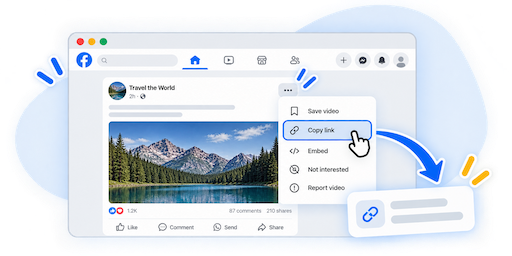
Open the Facebook video you want to download, use the Share or Copy Link option, and copy the video URL.
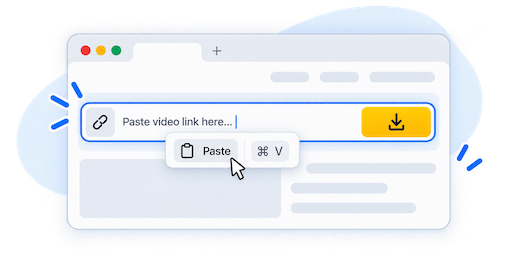
Paste the copied Facebook URL into the downloader field above and start processing the video.
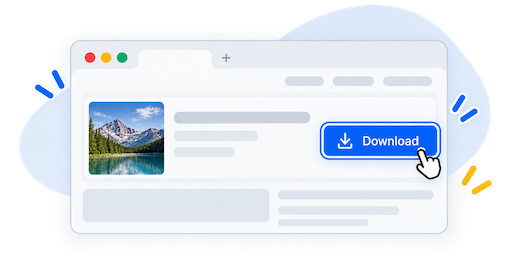
When the result is ready, choose an available download option and save the video to your device.
Start with an accessible Facebook video link, wherever you are browsing.
Use Share or Copy Link on the video, then switch to your browser to paste the URL.
Open the video itself on Facebook and copy its full URL rather than a profile or feed link.
Processing depends on access to the video. Private groups and restricted posts may not be available.
Use your phone, tablet, or computer browser. No additional downloader software is needed.
EzSave Facebook Downloader lets you process supported public Facebook video links through your browser. Open the video you want to save, copy its URL, and submit it in the form above. If a download result is returned, use the available option to save the video to your device.
Use the link to the individual video rather than a Facebook profile, page, or feed. A video that plays while you are signed in may still be restricted to friends or group members, so being able to watch it does not guarantee that the downloader can access it.
In the Facebook app, open the video and use Share or Copy Link when available. Return to your browser and paste the copied URL into EzSave. The sharing controls may appear in different places depending on the app version and how you opened the video.
On a computer, open the video itself on the Facebook website and copy its full address from the browser. If a shared post points to another website, use the downloader for the original platform instead. You can find the other tools on the EzSave homepage.
On your phone or tablet, switch from the Facebook app to your browser after copying the video link. On a laptop or desktop, keep Facebook and the downloader open in separate tabs. Once processing finishes, save the returned video through your browser's download controls.
Your browser decides where the file is stored. Check its download list or your device's Downloads folder, or choose a location if prompted.
This online Facebook video downloader does not require a desktop application, browser extension, or EzSave account. All you need to submit a video is its complete URL and a modern browser.
A download may not be available for every link. Private groups, friends-only posts, removed videos, or other access restrictions can prevent processing. If a public video fails, reopen it on Facebook, copy the link again, and check that you selected the video you intended to save.
Common questions about Facebook links, video availability, and saving your download.