YouTube URL Support
Paste a complete public YouTube video link and let the dedicated downloader process the source.

Save supported YouTube videos online for free, with no app needed.
Paste a complete public YouTube video link and let the dedicated downloader process the source.
Copy the exact public video URL from YouTube and paste it into the dedicated form.
See the formats and quality levels currently available for the submitted YouTube video.
Use the same YouTube download workflow from a phone, tablet, laptop, or desktop browser.
Process supported YouTube links without creating an account for EzSave.
There is no separate desktop program, mobile app, or browser extension to install.
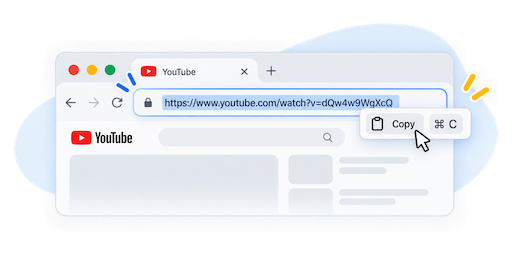
Open the public YouTube video and copy its URL from the address bar or Share menu.
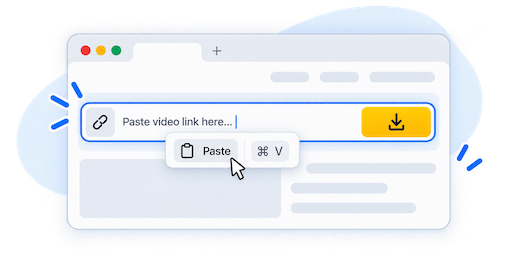
Paste the copied link into the YouTube download form and submit it for processing.
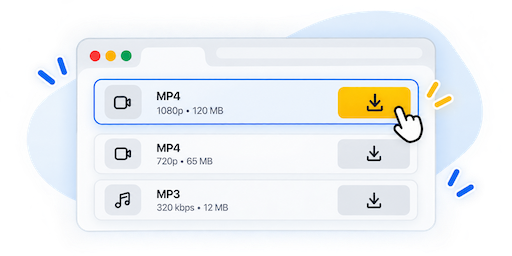
Select one of the available results and download the file to your device.
The choices shown after processing depend on the original YouTube video and current source availability.
Choose from the video file options returned for the submitted source when available.
Audio-only results may appear when they are supported for the processed YouTube video.
Available resolutions are determined by the original upload and the choices returned by the source.
EzSave YouTube Downloader is a focused browser tool for processing supported public YouTube videos. Paste a complete video URL into the form, wait for the source to be processed, and review the download results currently available for that video.
Begin on YouTube by opening the video you want to save. Copy its link from the browser address bar or the Share menu, then return to the downloader and paste the URL into the form. Once processing is complete, choose an available result and download the file through your browser.
The tool is designed around YouTube-specific links, so this page stays focused on that workflow instead of mixing it with instructions for other platforms. A complete public URL usually provides the clearest starting point.
Download choices are not identical for every YouTube video. Available video formats, audio-only results, and quality levels depend on the original upload and what the source currently returns. Process the link to see the options available for that particular video rather than expecting the same list every time.
Because the downloader runs online, you can use it from a modern browser on a phone, tablet, laptop, or desktop computer. Mobile users can copy a link from the YouTube app or website, while desktop users can copy it directly from the address bar. No separate downloader application or browser extension is required.
Private, removed, restricted, or region-limited videos may not be processed. Only download videos that you created, own, or have permission to save, and follow the rules that apply to the original content.